

Table of Contents
IT outsourcing has moved from a simple cost decision to a business management decision. Cloud platforms, Microsoft and Google environments, cybersecurity controls, and backups now sit in the same operational chain. Vendor coordination, user support and internal capacity pressure add more complexity.
The benefits of IT outsourcing are tied to reliability, security and clearer decision-making. The U.S. outsourcing services industry is expected to grow at a CAGR of over 9% from 2025 to 2030, while cost reduction remains the most cited driver at 63%.
Erez Zevulunov, CEO of M.I.T. Consulting at M.I.T. Consulting, notes: “Outsourcing works best when support, security, backups, and vendor decisions are managed as one operating system, not as disconnected tickets.”
Benefits Of IT Outsourcing For Operational Stability
Operational stability improves when support is not dependent on one busy employee, an informal “computer person,” or a vendor that only sees one slice of the en
vironment. North America’s IT services outsourcing market held over 32% global revenue share in 2024, reflecting demand for cost control and operational efficiency.
The cybersecurity workforce gap, estimated at 4.8 million people in 2024, also shows why hiring every specialty internally is unrealistic for many teams.
Research also shows that 65% outsource to keep internal teams focused on core business, while 53% use partners to close capability gaps.
Other reasons IT outsourcing builds a stronger operational infrastructure:
-
Broader technical coverage: Network and endpoint expertise can sit beside cloud, security and backup skills without hiring each role.
-
Reliable user support: Tickets for laptops, password resets, approvals, and Microsoft 365 access follow a defined path.
-
Stronger daily discipline: Patching, monitoring, backups, and access reviews happen on schedule.
-
Reduced key-person risk: Knowledge is documented instead of staying in one employee’s inbox.
-
More predictable planning: Hardware, licensing, warranties, and renewals are tracked before they become urgent purchases.
The next question is where limited internal capacity creates the most visible operational pressure.
Advantages Of Outsourcing IT Services When Internal Capacity Is Limited
The advantages of outsourcing IT services show up in daily workflow, especially when employees wait on access, devices, approvals, or vendor answers.
How do the advantages of outsourcing show up on a daily basis?
-
Consistent help desk coverage. Onboarding, password resets, software access, and device issues move through a ticket queue instead of hallway requests. That reduces delays for new hires, managers, and customer-facing staff.
-
Security process discipline. Endpoint protection, patching, identity controls, and incident response need clear ownership. IBM reported the global average cost of a data breach reached USD 4.88 million in 2024, so missed updates and weak access controls carry real financial consequences.
-
Cloud and SaaS governance. Microsoft 365 and Google Workspace need regular review. Permissions, licensing, and shadow IT need the same attention. Unused licenses create waste, while open file access creates avoidable data exposure.
-
Backup and recovery readiness. Restore points, recovery steps, and assigned responsibilities must be documented before an outage. If a SharePoint folder, accounting database, or server fails, the business needs to know who restores what, from where, and in what order.
-
Vendor accountability across systems. Internet providers, software vendors, hardware suppliers, and support teams often overlap. One coordinated support path prevents blame-shifting during outages.
Benefits Of Outsourcing IT Services Across Full and Co-Managed Models
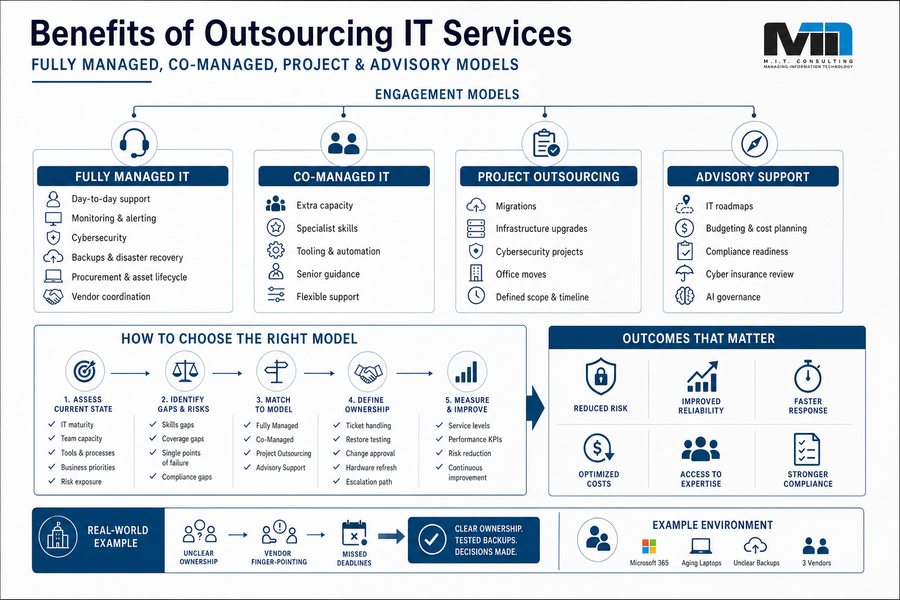
The benefits of outsourcing it services are easier to evaluate when each model is tied to a specific operating gap. Full outsourcing can cover daily support, monitoring and security. It can also handle backups and vendor coordination for organizations without internal IT. Co-managed IT fits internal teams that need extra capacity or senior guidance. The global managed services market reached 401 billion dollars in 2025 and is projected to hit 847 billion by 2033, with a 9.9 percent yearly growth rate.
Examples of this idea are:
-
Fully managed IT: Day-to-day support, monitoring and security plus backups, procurement and vendor coordination for teams without internal IT.
-
Co-managed IT: Extra capacity, specialist skills, and senior guidance for internal teams.
-
Project outsourcing: Migrations, infrastructure upgrades, cybersecurity improvements, and office moves.
-
Advisory support: Roadmaps and budgeting plus compliance readiness, cyber insurance review and AI governance.
A 60-user firm may have Microsoft 365, aging laptops, unclear backup ownership, and three vendors blaming each other during an outage. The right model clarifies who handles tickets, who owns restore testing, who manages vendor escalations, and who approves hardware replacement before another deadline is missed.
Explore IT Outsourcing Further
IT Outsourcing Pros And Cons That Affect Control And Cost
The it outsourcing pros and cons are clearest when governance is tested. Outsourcing increases control when scope, reporting, documentation, and shared responsibility are defined. Weak agreements can leave gaps around access, backups, exclusions, and vendor decisions.
Change is also difficult for users because people need to know where to submit tickets, who approves software, and how urgent issues escalate. A reported 73% of leaders experienced at least one major disruption caused by a third party in recent years, so vendor management belongs in the decision from the start.
Key examples of this include:
-
Define service scope: Include help desk, backups and cybersecurity plus cloud administration, procurement and vendor management.
-
Confirm support rules: Document service levels, escalation paths, support hours, and exclusions.
-
Require useful documentation: Track assets, credentials and licenses plus network diagrams, backup settings and recurring issues.
-
Review security practices: Check access controls, audit logs and endpoint protection plus incident response and provider access.
-
Plan exit terms: Keep control of accounts, data, licenses, and documentation.
Take Control Of Outsourced IT
See how MIT Consulting can help you align support, security, backups, and vendor management into one clear IT operating model.
IT Outsourcing Advantages And Disadvantages Before The Next Decision
The right IT support model depends on internal capacity and risk tolerance as well as cloud maturity, compliance needs, user support pressure and budget planning. When reviewing it outsourcing advantages and disadvantages, leaders should judge reliability and security alongside documentation, support quality and business alignment.
Avoiding outside expertise can leave security gaps, weak backups and slow modernization while also creating vendor confusion and overreliance on one person. M.I.T. Consulting is a Canadian-owned managed and co-managed IT partner, and organizations can contact M.I.T. Consulting to discuss the support model that fits their technology risk and budget planning.