


Table of Contents
When a clinic waits on access restoration, a law firm cannot reach secure matter files, or a contact center loses call routing, the issue is not only technical. It becomes ticket routing, downtime, escalation delay, approvals, compliance exposure, and customer service interruption. That is why understanding IT support tiers matters before work stalls, especially with 75% of customer service reps saying they saw the highest ever volume in customer service tickets in 2024. Clear tiering helps the right person handle the right issue sooner.
Erez Zevulunov, CEO of MIT Consulting at MIT Consulting, notes: “A tiered helpdesk works best when escalation rules match business risk, not technician convenience, so urgent access, security, and customer-facing issues move first.”
IT Support Tiers Explained For Daily Ticket Flow
A tier structure gives the service desk a practical way to control response time and workload. A password reset should not wait behind a firewall outage, and a Microsoft or Google account lockout should not bounce between teams while payroll approvals sit unfinished. MIT Consulting supports 9×5 in-house helpdesk coverage for many clients, while organizations with after-hours needs can use augmented 24×7 coverage across L1 to L3, with oversight and in-house escalation when needed. Structured support also reduces repeat work, as one Microsoft Unified analysis found ticket volume for Microsoft product issues fell by 35%, tickets were resolved 30% faster, and 15,750 hours were avoided over three years.
-
L1 intake and fixes: Handles common requests such as password resets, device setup, printer mapping, mailbox issues, and basic application access.
-
L2 deeper troubleshooting: Reviews patterns, failed updates, endpoint problems, permissions, and network symptoms.
-
L3 specialist work: Addresses infrastructure, security alerts, firewall changes, backup failures, and vendor escalations.
-
Escalation with approvals: Moves tickets to the right owner while preserving signoff for access changes, invoice systems, and sensitive data.
Tiers Of IT Support And Where Work Should Escalate
Escalation shows whether support has discipline. The tiers of IT support matter because each handoff affects staff time, approval speed, and the record of who did what, when, and why.
L1 acts as the front door. It confirms the user, captures the device, checks basic access, and resolves known issues such as a locked account or missing shared drive. L2 steps in when the issue requires deeper troubleshooting, such as a recurring VPN failure, a device that will not apply security updates, or a permissions conflict blocking an accounting file. L3 handles specialist work involving infrastructure, security tools, backups, vendor platforms, and root-cause analysis.
Wait time matters, especially when a survey found that 56 minutes pass on average before anyone acts on an alert. Faster escalation paths help, and more than 68% of survey respondents reported faster time to resolution for ticketing and incident response with Microsoft Unified.
At a dental clinic, one morning can include a label printer failure, patient record access problems, and a network slowdown affecting imaging uploads. L1 can restore the printer queue, L2 can review workstation and account permissions, and L3 can examine switching, firewall, or vendor platform issues without mixing patient data access into a general queue.
For smaller teams, MIT Consulting can act as the IT department. For larger organizations, it can co-manage with internal IT, matching escalation rules to compliance needs, budget, and internal capacity.
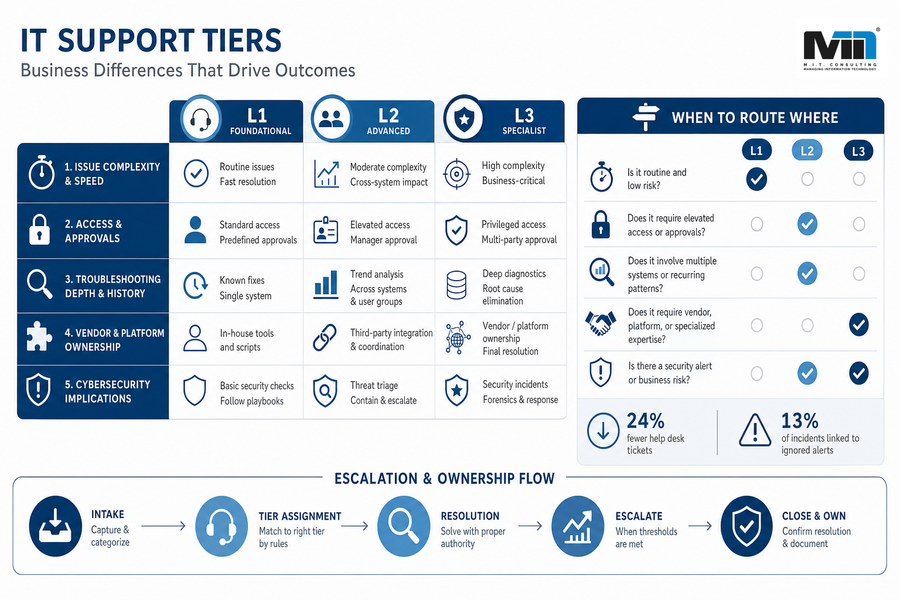
What Is The Difference Between Different IT Support Tiers In Business Terms
If you are asking what is the difference between different IT support tiers, the practical answer is the level of complexity, authority, risk, and ownership required to resolve an issue. Tiers should not force you into a higher package. Used properly, they match support coverage to operational exposure, with transparent recommendations and, when appropriate, third-party tools that fit better.
-
Issue complexity and speed
L1 clears routine interruptions such as password resets and new laptop setup. That keeps staff from waiting on simple tickets while specialists handle harder failures. -
Access permissions and approvals
A request to add a user to a legal document repository needs identity checks and manager approval. The wrong tier can create access errors that become compliance issues. -
Troubleshooting depth and history
L2 looks for repeated symptoms across endpoints, applications, and user groups. Survey respondents reported a 24% reduction in help desk tickets when reduced troubleshooting and maintenance effort improved IT efficiency. -
Vendor and platform ownership
L3 coordinates firewall vendors, cloud providers, backup platforms, or line-of-business software teams. Someone must own final resolution, not just forward the ticket. -
Cybersecurity implications
Security alerts need triage rules, not inbox drift. According to Unit 42, 13% of social engineering incidents were traced back to ignored or untriaged security alerts.
Related Guides To Faster IT Support
-
IT Problems That Slow Daily Operations And Raise Business Risk
-
Staff Augmentation Vs Managed Services: Choosing The Right IT Operating Model
-
Types Of Managed Services That Reduce IT Risk And Daily Support Gaps
-
Managed Services Vs Professional Services: Plan IT Work Without Chaos
-
The Benefits Of IT Outsourcing: Better Control Over IT, Security, And Cost
IT Technical Support Tiers For Compliance And Customer-Facing Teams
A contact center supervisor who cannot retrieve call recordings before a quality review has a different problem than a user who needs a headset paired. A medical office locked out of patient data, a school with a chat workflow failure, or an accounting firm unable to access its invoice system all need escalation tied to service impact and data sensitivity. IT technical support tiers give these workflows a path from intake to specialist response without treating every ticket the same.
-
Customer handoffs slow down: Failed call routing, email queues, chatbots, or social media workflows can leave agents without context.
-
Compliance evidence gets delayed: Call recording access, audit logs, secure document sharing, and permission changes need traceable handling.
-
Security alerts need priority: A survey found 56 minutes pass on average before anyone acts on an alert, and 13% of social engineering incidents were traced back to ignored or untriaged security alerts.
-
Outages affect real services: One study found 759 U.S. hospitals experienced IT outages after a faulty CrowdStrike update, including patient-facing and operational services.
The next step is to match tiering to the systems that carry the most workflow risk.
Contact center routing, cybersecurity monitoring, compliance support, and AI-enabled workflow tools all need clear escalation ownership.
Fix Ticket Delays Before Work Stalls
If support tiers are slowing your team down, MIT Consulting can help align escalation, helpdesk coverage, and business risk.
Matching Support Tiers To The Way Your Business Works
Changing a support structure affects people, approvals, workflows, and budgets. It changes who can approve access, which tickets interrupt managers, and which systems need attention after hours. That is why tier design should start with evidence from your own environment, not a generic package.
-
Audit ticket history: Review password resets, device failures, Microsoft or Google issues, network outages, and unresolved vendor tickets.
-
Find recurring issues: Identify repeat tickets by user group, location, endpoint type, or application so L2 or L3 can fix the cause.
-
Map escalation owners: Document who owns approvals for finance systems, patient records, legal files, backups, security alerts, and customer-facing platforms.
-
Decide after-hours coverage: Separate systems that can wait until morning from call routing, remote access, security monitoring, or invoice processing that cannot.
-
Review vendor responsibility: Clarify where your MSP, internal IT, software vendor, telecom provider, and hardware warranty support each take over.
Managed services spending rose to 18% of IT budgets in 2023, so the structure deserves careful review. A structured support model can also reduce noise; survey respondents reported a 24% reduction in help desk tickets when troubleshooting and maintenance effort improved IT efficiency. MIT Consulting can help you assess whether 9×5 support, augmented 24×7 coverage, co-managed IT, fractional CIO guidance, or strategic advisory services fit your operating reality. As a 100% Canadian-owned, privately held managed IT and advisory partner, it focuses on tailored recommendations, including third-party options when they are the better fit. If your team is still waiting on access restoration, call routing fixes, or unclear vendor handoffs, MIT Consulting can help turn those recurring tickets into a support model with clearer ownership.