


Table of Contents
An accounting team closing month-end doesn’t care whether a login issue is called support or project work. They care that approvals are stuck, invoices are waiting, and the same ticket keeps returning. That’s why managed services vs professional services is a business planning decision, not an IT vocabulary debate.
Michael Fin, CTO at M.I.T. Consulting, notes: “If the same issue keeps interrupting payroll, billing, or client files, treat it as an operational pattern before you price another one-off fix.”
Managed Services Vs Professional Services In Everyday Business Operations
Leaders need clean categories before they assign responsibility or approve spend. Otherwise, a firewall replacement, printer ticket, and compliance request all land in the same inbox with no clear path for timing, ownership, or budget. The security side makes this more than housekeeping: in a recent study, 60% of respondents said cybersecurity was the top challenge that led them to work with an MSP.
-
Daily stability coverage: Managed services provide ongoing coverage for users, systems, security, backups, and support. If a law clerk can’t access case software or a controller can’t open a shared folder, the issue already has an owner.
-
Planned project execution: Professional services handle defined outcomes, such as a Microsoft 365 migration, network upgrade, office move, compliance preparation, AI planning, or specialized implementation.
-
Different budget behavior: Recurring support normalizes monthly IT costs. Project work needs scope, timelines, approvals, and change controls so invoices match the work performed.
-
Cleaner vendor accountability: One accountable IT partner reduces finger-pointing between software providers, telecom carriers, hardware suppliers, and internal staff.
Managed IT Services And Professional Services For Growing Teams
Growth changes the kind of IT help a business needs. A 30-user firm often needs M.I.T. Consulting to act as the full IT department across hardware, software, support, backups, security, and vendors. A larger team may need co-managed support, vendor coordination, or fractional CIO guidance to plan the next office, platform, or security requirement without pulling internal staff away from daily operations.
Consider a nonprofit expanding donor management while moving staff into new Microsoft 365 groups, tightening endpoint security, and confirming backup coverage for donor records. That same week, staff still need help with login issues, printer access, and shared mailbox permissions. That mix calls for steady support and planned project ownership.
We see this context across over 400 businesses, from legal and accounting environments to education, manufacturing, and not-for-profit organizations. Security pressure also matters. In the referenced quarter, Professional Services recorded 100 notices, more than double the prior-year quarter.
The next step is deciding which capabilities stay always-on and which need a defined project plan. Help desk coverage, cybersecurity monitoring, backup and recovery, and project implementation all need clear ownership.
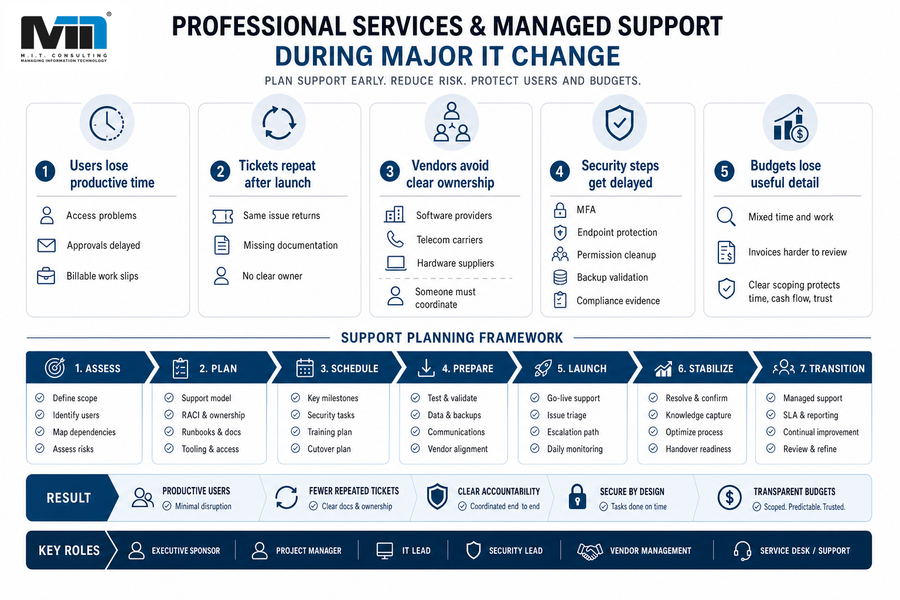
Professional Services And Managed Support During Major IT Change
Projects fail operationally when the people supporting users after launch are brought in too late. A cloud migration, VoIP change, device refresh, or new accounting system needs support planning before the first user ticket arrives.
-
Users lose productive time
Access problems, slow approvals, customer replies, and billable work. If a partner can’t open Caseware files after a laptop refresh, the project isn’t finished for that user.
-
Tickets repeat after launch
Missing documentation turns the same issue into a weekly ticket. The help desk gets the complaint, but not the project history.
-
Vendors avoid clear ownership
Software providers, telecom carriers, and hardware suppliers each handle their slice. Someone still needs to coordinate DNS, phones, warranties, licensing, and user impact.
-
Security steps get delayed
MFA, endpoint protection, permission cleanup, backup validation, and compliance evidence need dates in the project plan, not reminders after go-live.
-
Budgets lose useful detail
When daily support and project work are mixed without scope, invoices become harder to review. Clear scoping protects time, cash flow, and trust.
Plan Your IT Services Next
Choosing Between Managed Support And Professional IT Services
Organizational change gets harder when the same people approve invoices, chase vendors, answer staff questions, and manage tickets while normal work continues. A practical decision process keeps those pressures visible.
-
Map recurring tickets by category, owner, and business interruption. Password resets are routine support; repeated billing application failures point to deeper remediation.
-
Separate routine support from project outcomes before requesting pricing. “Support our users” and “migrate file shares to Google Workspace” belong in different scopes.
-
Identify systems affecting revenue, billing, customer data, donor records, or compliance. Those systems need stronger planning, testing, and rollback steps.
-
Confirm who owns vendor coordination before work begins, including carriers, software publishers, warranty providers, and cybersecurity platforms.
-
Ask for documentation, backup validation, security review, and post-project support handoff in the scope. We tailor recommendations to stage, budget, and risk rather than forcing one service tier.
Plan the Right IT Support Model
Unsure what should be ongoing support versus project work? M.I.T. Consulting can help you map the right path for your team.
Where Outsourced IT And Professional Services Fit Together
The strongest model often combines both. Managed services keep the business stable, while professional services move specific improvements forward. When the same partner understands users, vendors, backups, cybersecurity, and compliance obligations, fewer details get lost between the ticket queue and the project plan.
-
Support informs projects: Recurring PC Law, tax software, printer, or VPN tickets show where a system needs deeper work instead of another temporary fix.
-
Projects improve support: Better permissions, device standards, documentation, and backup records reduce service noise after a migration or office move.
-
Advisory connects priorities: Fractional CIO guidance ties IT work to budget, growth, insurance reviews, and frameworks such as NIST or CyberSecure Canada.
This matters because professional and scientific services was the second most impacted sector in the cited threat research, representing around 18% of observed activity. A calm review of service coverage, project scope, and advisory needs gives the next IT decision a clearer path. Less fragmentation.
A Practical Path For Your Next IT Decision
The useful question is simple: does this work keep daily operations stable, deliver a defined change, or require senior advisory oversight across budget, downtime, security risk, compliance requirements, and staff workload?
M.I.T. Consulting acts as the IT department when you don’t have one, and we co-manage alongside internal IT teams when that’s the better fit. If month-end tickets, a major project, or a security and compliance requirement are forcing the same people to chase systems, vendors, and approvals, contact us for a customized consultation grounded in your users, workflows, budget, and next decisions.