


Table of Contents
Pricing only matters when it connects to work happening at 9:15 on a Tuesday: users waiting on helpdesk tickets, endpoints needing updates, a network interruption slowing POS, and managers approving another monthly invoice. The cost of IT support for small business is not just a line item, especially when 66% of SMBs identify cost as their top obstacle to adopting stronger security. The IT support cost for small business should be understood through real workflows, not generic pricing tables.
Michael Fin, CTO at MIT Consulting, notes: “Support coverage should match the systems that stop revenue or client service when they fail, not the most expensive package on the rate sheet.”
What Shapes The Cost Of IT Support For Small Business
IT support pricing is driven by operational complexity, not only headcount. We map support to users, applications, network dependencies, risk tolerance, and budget, so the IT support cost is visible before the invoice arrives.
-
Users and endpoints: Desktops, laptops, mobile devices, and shared workstations need patching, monitoring, access control, and helpdesk support. More devices also mean more password resets, and the average IAM-related help desk ticket costs $30.
-
Coverage hours required: Standard business hours work for some offices. Customer service desks, production floors, and clinics often need 24/7 coverage because stalled work cannot wait until morning.
-
Cloud and application mix: Microsoft 365, Google environments, cloud files, permissions, backups, and business applications add administration effort, especially before a client handoff or month-end close.
-
Risk and compliance needs: Cybersecurity controls, access reviews, audit readiness, insurance requirements, and incident response planning change support scope because risk sits inside daily work.
Once these cost drivers are clear, the next decision is which support model fits how work actually gets done. Key capability areas include helpdesk coverage, endpoint management, cybersecurity monitoring, and cloud administration.
How The IT Support Cost For Small Business Changes By Support Model
Your support model determines whether IT stays reactive, is shared with an internal resource, or is fully managed. The right choice depends on ticket volume, staff capacity, system risk, and the cost of IT support compared with downtime, hiring, and recurring tickets.
-
Break-fix support only: Invoices are unpredictable, and technicians rebuild context during each incident. Repeated printer, Wi-Fi, or login tickets often remain unresolved at the root.
-
Co-managed IT support: Internal staff keep business context while we fill gaps such as escalations, monitoring, cybersecurity, and after-hours coverage. Co-managed support starts at $10 to $20 per endpoint.
-
Fully managed IT support: We handle helpdesk, endpoints, networks, cloud, backups, vendor coordination, and user support. L1 and L2 support runs from $75 to $95 per endpoint, while top-tier 24×7 support starts at $125 per endpoint, with a $200 monthly managed services minimum.
-
Project-based IT work: Migrations, Wi-Fi upgrades, digital signage, POS installations, relocations, and infrastructure refreshes are usually scoped separately, with their own timeline, approvals, and risk plan.
-
Advisory and fractional CIO support: Planning covers budgets, vendors, compliance, AI readiness, and long-term roadmaps. Retaining and training staff reduced costs by USD 259,000 on average, while SMB cyberattacks can cost more than $250,000.
Why IT Support Cost Should Be Evaluated Against Downtime
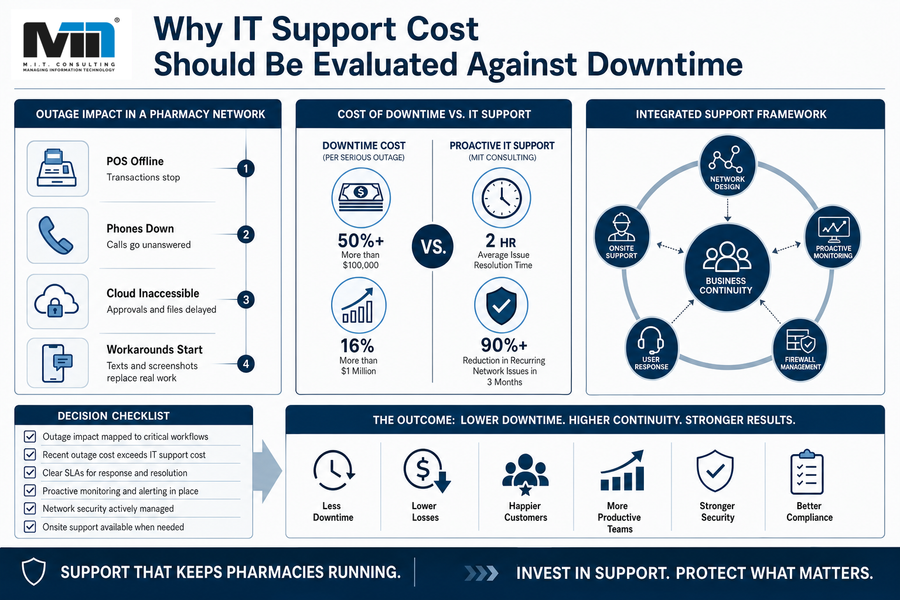
A pharmacy network outage is not just a router problem. POS terminals stop processing transactions, phones stop routing properly, and staff lose access to shared files needed for invoices, refill approvals, or customer service notes.
Context matters: when POS devices cannot process transactions, staff may switch to mobile hotspots while customer calls go unanswered. Approvals are delayed because cloud files are inaccessible, and a manager starts texting screenshots instead of completing work inside the system of record. That is where the average cost of IT support services needs to be weighed against lost work, not just monthly spend.
Large outage studies show why this matters: over half of respondents reported their most recent serious outage cost more than $100,000, and 16% cited more than $1 million. A New Relic report found median annual downtime from high-impact outages was 77 hours, with hourly costs up to $1.9 million, while Splunk estimates every minute of downtime can cost $15,000, or about $900,000 an hour. We maintain a 2-hour average issue resolution time for network support and have helped clients reduce recurring network issues by over 90% after three months.
Reducing downtime requires support that connects network design, monitoring, and user response into one operating rhythm. Capability areas include network troubleshooting, proactive monitoring, firewall management, and onsite support.
Explore IT Support Cost Drivers
-
IT Support Tiers: How To Stop Ticket Delays Before Work Stalls
-
IT Infrastructure Outsourcing: Scale Systems Without Adding Headcount
-
IT Problems That Slow Daily Operations And Raise Business Risk
-
Staff Augmentation Vs Managed Services: Choosing The Right IT Operating Model
-
Types Of Managed Services That Reduce IT Risk And Daily Support Gaps
What The Cost Of IT Support Should Include Beyond Helpdesk Tickets
The invoice should reflect operational protection, not just ticket handling. We support over 10,000 support tickets per year and resolve over 80% of IT tickets or issues on the first call, but first-call resolution is only one part of stable operations.
-
User onboarding and offboarding: New employees need accounts, permissions, device setup, email access, MFA, and shared drive access before their first client handoff. Departing employees need access removed the same day.
-
Cybersecurity controls and monitoring: Endpoint protection, vulnerability scans, cyber risk assessments, and 24/7 monitoring should connect to real workflows. More than three-quarters of small businesses say a breach cost at least $250,000, with 37 percent losing more than $500,000.
-
Backup and recovery planning: Backups must be tested against recovery priorities for cloud files, servers, and business applications. Having backups is different from knowing they restore.
-
Vendor and hardware coordination: We coordinate warranties, firewall licensing, phones, internet providers, and cloud subscriptions so issues do not bounce between vendors while users wait. Our vendor-neutral hardware sourcing means we recommend the right fit, even when a third-party product better suits the environment and budget.
Clarify Your IT Support Costs
See how your users, systems, coverage needs, and risk profile shape support planning with MIT Consulting.
How To Compare The Average Cost Of IT Support Services Before Signing
Changing IT providers affects users, approvals, invoices, system access, and daily habits. Before signing, compare how each provider handles the work behind the monthly fee.
-
Map recurring tickets first: Ask for a review of repeated issues, affected users, business systems, and root causes.
-
Separate support from projects: Clarify what is included monthly and what is billed separately, including migrations, cabling, Wi-Fi access points, POS work, or relocations.
-
Confirm response expectations: Define standard response, escalation, onsite availability, and after-hours coverage before signing. We offer 9×5 and 24/7 helpdesk options, with remote and onsite support.
-
Review security responsibilities: Identify who manages MFA, backups, endpoint protection, firewall rules, access reviews, and incident response.
-
Ask for planning cadence: Confirm whether advisory reviews, budget planning, compliance readiness, and roadmap discussions are included. Fractional CIO support can range from annual reviews to weekly cadence calls.
A Practical Next Step For IT Support Planning
Evaluate support cost through operational fit: users, endpoints, network stability, cybersecurity, cloud access, helpdesk coverage, and future projects such as migrations, office moves, POS upgrades, or compliance preparation.
MIT Consulting works with Toronto and Ontario businesses as a long-term advisor, bringing transparent, needs-based recommendations rather than pushing a package that does not match how work gets done. With 23 years in business, over 400 supported businesses, and more than 30 certified professionals, we can review your current support model, ticket patterns, coverage gaps, and cost structure with practical attention to daily workflows. If the right fit is co-managed support, a project engagement, advisory planning, or fully managed service, we will explain the tradeoffs clearly so approvals, invoices, users, and systems line up with the level of risk you actually carry.